
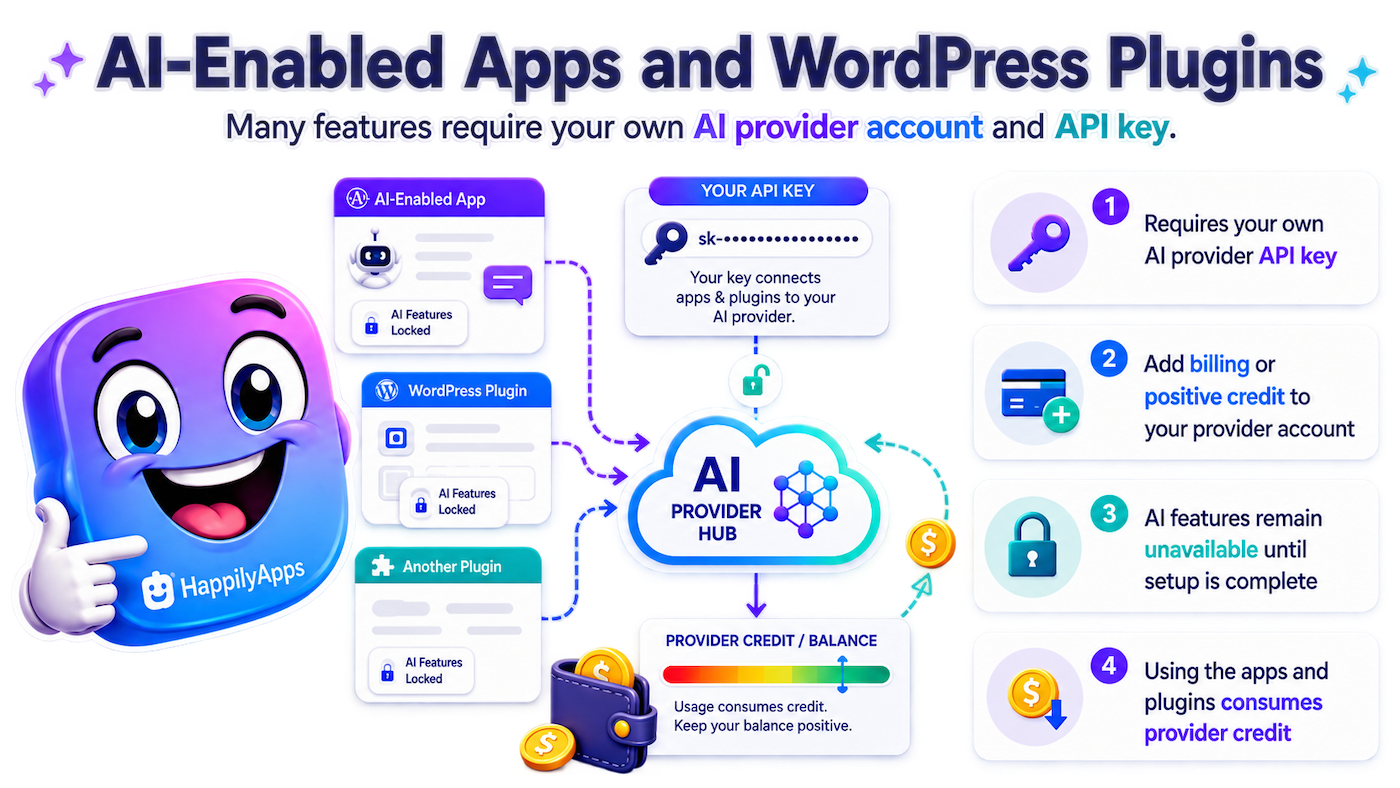
AI-Enabled Apps and WordPress Plugins
What You Need to Know About API Keys, Provider Billing, Credits, and Usage
Important: Many HappilyApps products include AI-powered features that connect directly to a third-party AI provider. To use those features, you will need your own account with a supported AI provider, a valid API key, and an account with sufficient billing, credit, or available quota for API requests.
How AI-Enabled HappilyApps Products Work
HappilyApps provides the application or WordPress plugin. The artificial intelligence itself is supplied by an external AI provider. Your HappilyApps product uses the API key you enter to send authorized requests from your site or app to the provider you choose.
-
Create an account with a supported AI provider.
-
Create an API key in that provider’s developer platform.
-
Set up API billing and maintain sufficient credit, balance, or quota.
-
Enter the API key into the provider setup area of the HappilyApps product.
-
The product will test the connection before AI-dependent features are enabled.
-
Each AI request consumes provider resources and may incur a charge from that provider.
AI Provider Charges Are Separate
The price you pay for a HappilyApps app, plugin, or Pro license does not include AI-provider usage charges.
API usage is billed directly by the AI provider to your provider account. HappilyApps does not collect those charges, set provider prices, or control changes to pricing, rate limits, credit policies, or supported models.
What Happens If Your Balance or Quota Runs Out?
If your API key is invalid, billing is not active, prepaid credit is exhausted, or the provider places your account over a usage or rate limit, AI-powered functions may pause, fail, or remain unavailable.
Restore billing, add credit, or wait for the provider’s usage or rate limit to reset, then retry the feature.
How Much Will AI Usage Cost?
There is no single fixed API cost. Cost depends on the provider, AI model, amount of text or media processed, amount of content generated, and the provider’s current pricing.
Some providers offer limited free usage, but free tiers can change and may not support every model or feature.
Keep Your API Key Private
An API key acts like a password for your provider account. Do not post it publicly, include it in screenshots, or send it in ordinary email or support messages.
Enter it only in the designated provider settings inside the HappilyApps product. If a key is exposed, revoke it in the provider dashboard and create a new one.
OpenAI
OpenAI provides API access to models used for text generation, analysis, speech, images, and other AI functions.
A ChatGPT subscription and OpenAI API billing are separate services. Having a ChatGPT subscription does not automatically provide OpenAI API credit.
Official OpenAI resources
API Keys: OpenAI API Keys
Billing: OpenAI API Billing
Usage: OpenAI API Usage Dashboard
Pricing: OpenAI API Pricing
Typical setup: Sign in to the OpenAI Platform, create an API key, add payment details or prepaid credit, then copy the key into the OpenAI provider settings in your HappilyApps product.
Google Gemini
Google’s Gemini API is managed through Google AI Studio and Google Cloud billing. Your API key belongs to a Google project, and that project’s billing status, usage tier, quotas, and available credit determine which API requests can be processed.
Official Google Gemini resources
API Keys: Google AI Studio API Keys
Billing: Gemini API Billing
Usage: Gemini API Usage
Billing Documentation: Gemini Billing Documentation
Pricing: Gemini API Pricing
Typical setup: Open Google AI Studio, create or select a project, create an API key, and enable billing if the HappilyApps feature or Gemini model you are using requires paid access.
Google supports free-tier and paid-tier API usage, but limits and model availability differ.
DeepSeek
DeepSeek provides developer API access through the DeepSeek Platform. API usage is metered, and charges are deducted from the available topped-up or granted balance according to DeepSeek’s current model pricing.
Official DeepSeek resources
API Keys: DeepSeek API Keys
Balance/Billing: DeepSeek Account Balance
Usage: DeepSeek API Usage
Pricing: DeepSeek API Pricing
Typical setup: Create or sign in to a DeepSeek Platform account, add funds if needed, create an API key, and enter that key into the DeepSeek provider settings in your HappilyApps product.
As requests are processed, the associated usage cost is deducted from the DeepSeek account balance.
Common Questions
Do I pay HappilyApps for the AI usage?
No. Your AI provider bills API usage directly to your provider account. Your HappilyApps purchase covers the HappilyApps software or license, not third-party API usage.
Can I use the same API key in more than one HappilyApps product?
Usually yes, if the provider permits it and the key can access the required models. All usage charged to that key contributes to the same provider account’s spending and limits.
Why does the plugin say my provider is not ready?
Common causes include an invalid or revoked API key, missing billing, no remaining credit, insufficient quota, model-access restrictions, or a temporary provider rate limit.
Will HappilyApps work without an AI provider?
Non-AI features may still work, depending on the product. Features requiring an external AI model remain unavailable until a supported provider is successfully connected.
Can AI-provider prices change?
Yes. AI providers set their own prices, models, billing policies, limits, and credit rules. Always review the provider’s current pricing page before enabling high-volume or automated features.
Recommended Setup Checklist
-
Create an account with a supported AI provider.
-
Create an API key.
-
Add a payment method and/or provider credit as required.
-
Confirm sufficient balance, quota, and model access.
-
Paste the API key into the HappilyApps provider setup screen.
-
Run the connection test.
-
Enable AI features only after the connection test succeeds.
-
Monitor provider usage and billing regularly.
-
Consider spending limits or automatic credit reloads where available.
Provider information changes over time. Pricing, billing methods, free tiers, rate limits, model availability, and dashboard locations are controlled by each provider. Use the official provider links above for the most current information.